Posts

在甲骨文云上安装nextcloud

Image
#!/bin/bash # Update apt sudo apt update # Install snapd sudo apt install snapd # Install Nextcloud via snap sudo snap install nextcloud # Manually install Nextcloud with admin pw "kizens" sudo nextcloud.manual-install admin kizens # Set trusted domain for Nextcloud sudo nextcloud.occ config:system:set trusted_domains 1 --value=cloud.yourdomain.com # Open ports 80 and 443 sudo iptables -A INPUT -p tcp -m state --state NEW -m tcp --dport 80 -j ACCEPT sudo iptables -A INPUT -p tcp -m state --state NEW -m tcp --dport 443 -j ACCEPT # Save the iptables rules sudo iptables-save > /etc/iptables/rules.v4 # sudo iptables-restore </etc/iptables/rules.v4 sudo iptables-restore < /etc/iptables/rules.v4 # Enable HTTPS with Let's Encrypt sudo nextcloud.enable-https lets-encrypt # Restart Nextcloud sudo snap restart nextcloud --将以上代码逐行执行 或 save as nextcloud-setup.sh 注意修改初始密码kizens 以及绑定域名为你自己的 域名 cloud.yourdomain.com  请在域名注册商处修改2级域名的A记录,指向甲骨文云主机的公网IP 然后执行,以下2行命令,第一行是修改文件属性,第二行是执行...

SRT时长统计python程序源代码

Image
  目前只有一个初级的版本,计算单个srt文件的时长总和。只需要把文件的最后3行处的文件名.srt替换成你需要统计的那个文件名即可。 备注需要被统计时长的srt文件需要与该py文件在同一个文件目录下。  在Windows上安装Python非常简单,只需按照以下步骤操作即可: 前往Python官网下载页面: https://www.python.org/downloads/windows/ 在下载页面中,选择适合你操作系统的Python版本。通常建议选择最新版本,例如Python 3.10.0。 下载完成后,双击下载的安装包,打开安装程序。 在安装程序中,按照提示点击“Next”按钮,直到进入“Customize Python”页面。 在“Customize Python”页面中,建议勾选“Add Python 3.10 to PATH”选项,以便在命令行中可以直接使用Python命令。 点击“Install”按钮,开始安装Python。 安装完成后,可以在“Start”菜单中找到Python的安装目录。也可以在命令行中输入“python”命令,验证Python是否已经成功安装。 以上就是在Windows上安装Python的简单步骤。如果需要对Python进行更深入的学习和使用,可以参考Python官方文档或者其他相关的教程。 --以下是python程序源代码,将其全选复制保存为SRT-TDM.py即可在安装了python的环境下运行-- import codecs import re from datetime import timedelta def calculate_total_duration(file_path):     with codecs.open(file_path, 'r', encoding='utf-8') as f:         srt_content = f.read()     # 其他代码            # 使用正则表达式匹配时间戳   ...

无需VPS,还永久免费的VPN?!

Image
那就是 CloudFlare 的WARP! 1.1.1.1 Warp是Cloudflare推出的一项移动应用程序,旨在提高移动设备的互联网速度和安全性。它使用了类似于虚拟私人网络(VPN)的技术,将移动设备的网络流量路由到Cloudflare的全球网络中,从而提供更快的访问速度和更高的安全性。 与传统VPN不同的是,1.1.1.1 Warp使用了一个名为“Warp”的协议,该协议旨在提高移动设备的连接速度和可靠性,同时保持数据的安全性和隐私性。此外,1.1.1.1 Warp还提供了一种称为“Warp+”的高级功能,该功能可以进一步提高速度和可靠性,并允许用户访问一些被封锁的网站和应用程序。 总之,1.1.1.1 Warp是一种旨在提高移动设备互联网速度和安全性的移动应用程序,可以通过将网络流量路由到Cloudflare的全球网络中来实现这一目标。   首先就是去1.1.1.1下载对应操作系统的应用程序。 目前最为推荐的就是Windows版本下的WARP。 安装完了以后,就直接连接。并运行优选IP的第三方程序。绑定CloudFlare的官方服务器,就大功告成了。再也不用自己去苦苦寻找VPS,搭建各类服务器端程序了。 WARP优选IP的第三方程序包下载地址如下: https://drive.google.com/file/d/12qzNne-cQYUn6o_cX21N9q43yC2761m-/view?usp=sharing 真实的使用体验是,速度提升明显,稳定性也不差。毕竟是拥有1.1.1.1的公司提供的协议和良心服务。

Stable Diffusion AI绘图工具的Web界面

安装Stable Diffusion AI绘图工具的Web界面需要使用Google Colab平台,该平台提供了一个免费的云端Jupyter Notebook环境,可以让用户使用Python进行数据分析和机器学习等任务。以下是安装Stable Diffusion AI绘图工具的Web界面的步骤和优势: https://github.com/camenduru/stable-diffusion-webui-colab 模型 https://civitai.com/

一个不错的GPT桌面应用

Image
   来源: https://github.com/Bin-Huang/chatbox   Download Click to view all download options Supported platforms: Mac : please download .dmg and .tar files. It supports x64 and arm64 (compatibility with x64 is tested). Windows : please download the .msi file. Linux : please download the .AppImage and .deb files."

github.com/Nyr/wireguard-install

Image
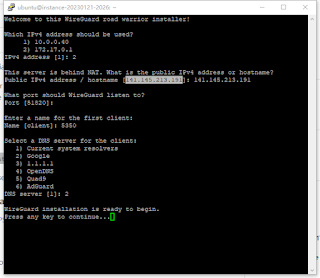
继上一期介绍纯命令行安装OPENVPN服务器之后,又发现了同一家Nyr的纯命令行安装wg开源代码。 来源如下:https://github.com/Nyr/wireguard-install 也是2行代码,直接生成二维码可以供手机扫描使用。这样省去了下载配置文件的麻烦,非常省心。 首先下载安装脚本 wget https://git.io/wireguard -O wireguard-install.sh 更改文件为可执行属性 chmod +x wireguard-install.sh 然后执行 sudo ./wireguard-install.sh 回答一些参数设置的问题,就可以安装起来了...

openvpn-install easy without web ui

支持 Debian 9 或 Centos 7/8 或 Ubuntu 18 或更高版本 OpenVPN搭建代码: wget https://git.io/vpn -O openvpn-install.sh && bash openvpn-install.sh 源于: https://github.com/Nyr/openvpn-install

wireguard easy server setup

  If you haven't installed Docker yet, install it by running: $ curl -sSL https://get.docker.com | sh $ sudo usermod -aG docker $( whoami ) $ exit Run WireGuard Easy  ––––––––––––– docker run -d \   --name=WG-SCX \   -e WG_HOST=🚨你的伺服器IP \   -e PASSWORD=🚨你的管理界面密碼 \   -e WG_DEFAULT_DNS=8.8.8.8,8.8.4.4 \   -v ~/.wg-easy:/etc/wireguard \   -p 51820:51820/udp \   -p 51821:51821/tcp \   --cap-add=NET_ADMIN \   --cap-add=SYS_MODULE \   --sysctl="net.ipv4.conf.all.src_valid_mark=1" \   --sysctl="net.ipv4.ip_forward=1" \   --restart unless-stopped \   weejewel/wg-easy ––––––––––––––––––––––––––––––   ➡️ GitHub Repo (wg-easy): https://github.com/WeeJeWel/wg-easy docker images docker ps -a docker stop id docker rm id to check ...

数字海洋注册链接

https://m.do.co/c/f531c90d487b The simple cloud that drives business growth --- Start building today Sign up now and you'll be up and running on DigitalOcean in just minutes.

mid journey test "pilot_in_a_plane"

Image
    pilot_in_a_plane Midjourney Discord Server: https://discord.gg/midjourney

srt文件字幕提取时间轴,统计时长

Image
https://blog.csdn.net/mobius0816/article/details/116271229 srt文件用notepad++打开 正则表达式 在当前文件中查找 (?m)^([0-9])(.*?).{28}

oracle甲骨文云首次注册与多次注册通过全过程要点解析!把握四要素(邮箱、环境、IP、银行信用卡),注册甲骨文都一次通过。

来源: https://www.youtube.com/watch?v=YINe1JZ9Yd0

Oracle甲骨文云ARM后台升降级配置流程,无限刷临时公共IP,预留IP应用,甲骨文云开启原生IPV6、后台端口规则设置流程,引导卷删除与容量设置

来源: https://www.youtube.com/watch?v=rTYDSYjFoBk

甲骨文VPS 真的是永久免费的吗?为什么在扣除费用?甲骨文vps费用查询,甲骨文vps实例预留ip,甲骨文VPS自选IP

来源: https://www.youtube.com/watch?v=ajzEl0dzxXk

甲骨文云改密钥登录为root加密码的方法

来源: https://www.youtube.com/watch?v=8mVeai2TTWk  

iptable防火墙设置

  sudo cp /etc/iptables/rules.v4 /etc/iptables/rules.v4.bak && sudo truncate -s 0 /etc/iptables/rules.v4

htop显示系统运行资源

 >sudo apt install htop 安装后执行htop就可以看到状态 ctrl+c 退出 htop 另外还有一个htop的简化版就是top top无需安装,直接可以运行。

修改系统时区

Image
  How To Set or Change Timezone on Ubuntu 20.04 https://linuxize.com/post/how-to-set-or-change-timezone-on-ubuntu-20-04/  Using the correct timezone is essential for many systems related tasks and processes. For example, the cron daemon uses the system’s timezone for executing cron jobs, and the timestamps in the log files are based on the same system’s timezone. On Ubuntu, the system’s timezone is set during the install, but it can be easily changed at a later time. This article describes how to set or change the timezone on Ubuntu 20.04 using the command line, or through the GUI. Prerequisites Only the root or user with sudo privileges can set or change the system’s timezone. Checking the Current Timezone timedatectl is a command-line utility that allows you to view and change the system’s time and date. It is available on all modern systemd-based Linux systems, including Ubuntu 20.04. To print the current system’s timezone invoke the timedatectl without any argumen...

SSH from linux

  Connecting to a Linux Instance You connect to a Linux instance using SSH. To connect to a Linux instance from a Unix-style system Use the following command to set the file permissions so that only you can read the file: chmod 400 <private_key_file> <private_key_file> is the full path and name of the file that contains the private key associated with the instance you want to access. Use the following SSH command to access the instance. Note Copy the following example to ensure the correct characters are used. If the wrong character is used in ssh -i , a Could not resolve hostname ...: No such host is known. error might occur. ssh -i <private_key_file> <username> @ <public-ip-address> <private_key_file> is the full path and name of the file that contains the private key associated with the instance you want to access. <username> is the default username for the instance. For Oracle Linux and CentOS images, the defau...

Paxful来了

在Paxful, 我可以通过350多种方式与真人交易比特币和其他数字货币。 此外,我还可以存储加密货币、将其转换为其他加密货币、 赚取收入等等。快来加入我吧! https://paxful.com/register?r= wNkqyq29Xk6